
Last updated on
Oct 31, 2026
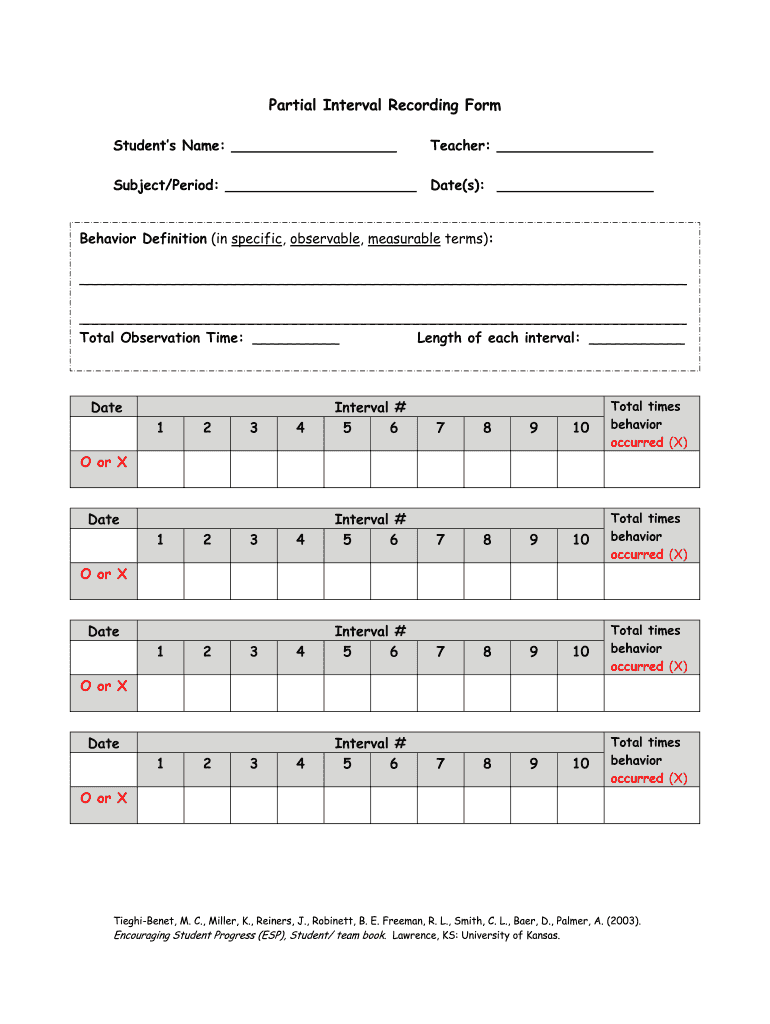
University of Kansas Partial Interval Recording Form free printable template
pdfFiller is not affiliated with any government organization

Fill out
Complete the form online in a simple drag-and-drop editor.

eSign
Add your legally binding signature or send the form for signing.

Share
Share the form via a link, letting anyone fill it out from any device.

Export
Download, print, email, or move the form to your cloud storage.
Why pdfFiller is the best tool for your documents and forms


End-to-end document management
From editing and signing to collaboration and tracking, pdfFiller has everything you need to get your documents done quickly and efficiently.
Accessible from anywhere
pdfFiller is fully cloud-based. This means you can edit, sign, and share documents from anywhere using your computer, smartphone, or tablet.
Secure and compliant
pdfFiller lets you securely manage documents following global laws like ESIGN, CCPA, and GDPR. It's also HIPAA and SOC 2 compliant.
What is University of Kansas Partial Interval Recording Form
The Partial Interval Recording Form is an educational document used by educators to track and document student behavior over specified intervals.
pdfFiller scores top ratings on review platforms




easy to use, documents look much more professional than hand written
Easy to use and understand for someone with little to no knowledge of forms and legal documents.
Who needs University of Kansas Partial Interval Recording Form?
Explore how professionals across industries use pdfFiller.

University of Kansas Partial Interval Recording Form is needed by:
-
Teachers documenting student behavior
-
Educational administrators overseeing behavior tracking
-
Special education professionals assessing student progress
-
School psychologists analyzing behavioral data
-
Behavior interventionists implementing strategies
Comprehensive Guide to University of Kansas Partial Interval Recording Form
What is the Partial Interval Recording Form?
The Partial Interval Recording Form is a student behavior tracking form used primarily in educational settings. Its main function is to document specific behaviors of students during predefined intervals, providing educators with valuable data on student engagement and progress. This form is an integral part of the "Encouraging Student Progress (ESP)" program, designed to enhance student learning experiences.
By utilizing this partial interval recording form, educators can systematically observe and record student behaviors, allowing them to make informed decisions that support student development. The form plays a critical role in implementing effective behavioral interventions.
Purpose and Benefits of the Partial Interval Recording Form
The importance of the Partial Interval Recording Form lies in its ability to track specific, observable behaviors in students. By documenting behaviors accurately, educators gain insights into each student's progress and needs. This form helps teachers make informed decisions regarding instructional strategies and supports tailored to individual students.
-
Facilitates focused observation of student behaviors over time.
-
Enhances the ability to make evidence-based decisions regarding student support.
-
Allows educators to identify patterns and trends in student behavior.
Utilizing this educator observation form can ultimately improve educational outcomes by providing clear data on student behavior trends.
Key Features of the Partial Interval Recording Form
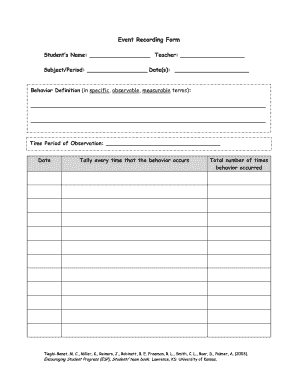
The Partial Interval Recording Form is structured with distinct functionalities that streamline the process of behavior observation. It includes various fields, such as the student's name, teacher, subject or period, and date(s). Each observation involves specific time intervals during which educators can record student behaviors.
Key features of this ESP student progress form include:
-
Blank fields for capturing essential details about the student and observation.
-
Checkboxes for indicating behavior occurrences within each interval.
-
Fields to note total observation time and the length of each interval.
Who Needs the Partial Interval Recording Form?
The target audience for the Partial Interval Recording Form primarily consists of educators working with various age groups and learning needs. Special education teachers, school administrators, and educational support staff benefit from using this tool to track student progress effectively.
-
General education teachers aiming to enhance classroom management.
-
Special education teachers focused on individualized student assessments.
-
School administrators responsible for monitoring student behavior trends across the school.
This partial interval recording form is a vital resource for professionals dedicated to improving student outcomes and ensuring educational success.
How to Fill Out the Partial Interval Recording Form Online
Filling out the Partial Interval Recording Form online is a straightforward process. Below is a step-by-step guide to assist users in completing the form using pdfFiller:
-
Access the form on pdfFiller's platform.
-
Fill in the required blank fields such as Student’s Name and Teacher.
-
Indicate the observed behaviors using the checkboxes provided.
-
Specify the date and total observation time accurately.
-
Review all entered information for accuracy before submission.
By following these steps, educators can ensure that they effectively utilize the behavior recording template for accurate data collection.
Using pdfFiller to Fill Out the Partial Interval Recording Form
pdfFiller enhances the process of filling out the Partial Interval Recording Form with a range of user-friendly features. Users can easily edit text, annotate, eSign, and share completed documents directly from the platform.
Security is a top priority when handling sensitive student data. pdfFiller employs measures such as 256-bit encryption and compliance with HIPAA and GDPR, ensuring data privacy and protection during the filling process. Educators and administrators will find that using pdfFiller streamlines their workflows and simplifies form handling.
Submission Methods and Requirements for the Partial Interval Recording Form
Once the Partial Interval Recording Form is completed, it can be submitted through several methods. Educators should consider the following options for submission:
-
Digital submission via email or online form upload.
-
Print and physically hand in to the relevant school authorities.
It is essential to ensure that submissions are made in accordance with the school's policies, including required distribution to school administrators or districts for record-keeping compliance.
Common Errors and How to Avoid Them
When filling out the Partial Interval Recording Form, users may encounter common pitfalls that can affect data integrity. Some errors include misrecording observation intervals and incorrectly noting observed behaviors. To help avoid mistakes:
-
Double-check the timing for each interval to ensure accuracy.
-
Carefully write and verify behavior observations before submission.
Utilizing pdfFiller's validation features can further minimize errors before finalizing the document.
Security and Compliance for the Partial Interval Recording Form
Ensuring the security and compliance of student information is critical when using the Partial Interval Recording Form. pdfFiller implements robust security measures, including encryption and adherence to educational privacy laws, to protect sensitive data.
Educators must recognize the importance of maintaining privacy for student information. By utilizing platforms like pdfFiller, they can confidently manage records while adhering to compliance standards, providing peace of mind during the documentation process.
Real-Life Examples of Completed Partial Interval Recording Forms
To better understand the application of the Partial Interval Recording Form, consider reviewing sample instances of completed forms. These examples demonstrate how educators record behaviors during various intervals, helping visualize the process.
-
Example scenarios showing different student interactions and behaviors recorded accurately.
-
Illustrations of how diverse educators implement the form in various classroom settings.
Reviewing these sample completed partial interval recording forms can enhance users' understanding and applicability of this essential educational tool.
How to fill out the University of Kansas Partial Interval Recording Form
-
1.Access the Partial Interval Recording Form by navigating to pdfFiller's website and using the search bar to find the form.
-
2.Click on the form to open it in the pdfFiller interface. You can zoom in or adjust the view for better visibility.
-
3.Gather necessary information such as the student's name, teacher's name, subject or period, and relevant dates before starting to fill out the form.
-
4.Begin by entering the student's name and the teacher's name in the designated fields provided at the top of the form.
-
5.Next, fill in the subject or period where the observation will take place. Ensure accuracy to avoid confusion.
-
6.Specify the observation dates in the fields provided, ensuring that the intervals for behavior tracking are clear.
-
7.Locate the sections of the form designed for behavior recording. You will find checkboxes marked with 'O' for occurrence and 'X' for non-occurrence of specified behaviors.
-
8.As behaviors occur, use the checkboxes to mark accurately according to the observed behaviors across the defined intervals.
-
9.At the end of your observation session, review all entries to make sure information is accurate and complete. Double-check dates, names, and recorded behaviors.
-
10.To finalize, save the form by clicking the 'Save' button. You may also download a copy by selecting the 'Download' option from the file menu.
-
11.If submitting electronically, follow the prompts to submit the completed form through pdfFiller's submission feature.

Who can use the Partial Interval Recording Form?
The Partial Interval Recording Form can be used by teachers, special education professionals, and behavior interventionists who need to track and document student behavior for assessment purposes.
Are there any specific requirements to fill out this form?
There are no specific eligibility requirements to use the Partial Interval Recording Form. However, users should possess knowledge of the behaviors being tracked and collection methods.
What is the deadline to submit this form?
While the form itself does not have a universal deadline, it's best to complete and submit it promptly after observations to ensure timely monitoring of student progress.
How can I submit the completed form?
Once completed, you can submit the form through pdfFiller's submission options or download and email it to relevant parties such as school administrators or behavioral specialists.
What common mistakes should I avoid when using this form?
Common mistakes include incorrect data entry, failing to document each observation period, and not double-checking the form for accuracy before submission. Be diligent in recording behaviors.
How can I save my progress while filling out the form?
To save your progress, simply click the 'Save' button within pdfFiller. This allows you to return to the form later without losing any inputted information.
Does this form require notarization?
The Partial Interval Recording Form does not require notarization. It is an internal document used for educational purposes rather than a legal form.
Related Content
Related Forms



Related Catalogs
Get the latest insights from our blog


If you believe that this page should be taken down, please follow our DMCA take down process
here
.
This form may include fields for payment information. Data entered in these fields is not covered by PCI DSS compliance.